Take a moment and think about this.
Do raw numbers alone help a business owner to make confident financial decisions?
Well, not really!
Daily transactions such as sales entries, purchase invoices, and expense records tell you what happened in the business. But without structured financial reports and MIS reports in Tally, those numbers rarely reveal the bigger picture of business performance, which includes insights into profitability, cash flow, and overall financial health. What matters is turning that financial data into meaningful insights. This is where MIS reports become valuable.
A Management Information System (MIS) report helps businesses transform everyday accounting records into structured information that reveals how the company is performing. When it comes to company decision-making, the report acts as a critical factor by providing insights that guide strategic planning, resource allocation, and performance evaluation.
For growing businesses, especially in competitive markets like the UAE, having quick access to Tally business reports, inventory reports, and sales analysis reports can make a real difference in decision-making.
In this guide, we will explore how to generate MIS reports in Tally, the key reports businesses should monitor regularly, and how these insights can support better financial decision-making and business growth.
What is an MIS Report?
An MIS report acts as a crucial tool for businesses because it converts everyday accounting data into useful insights for decision-making. Instead of relying on raw numbers, businesses can use MIS reports in Tally to understand their financial performance and operational trends more clearly. The data in these reports provides a clear view of where a business currently stands and highlights areas that require improvement.
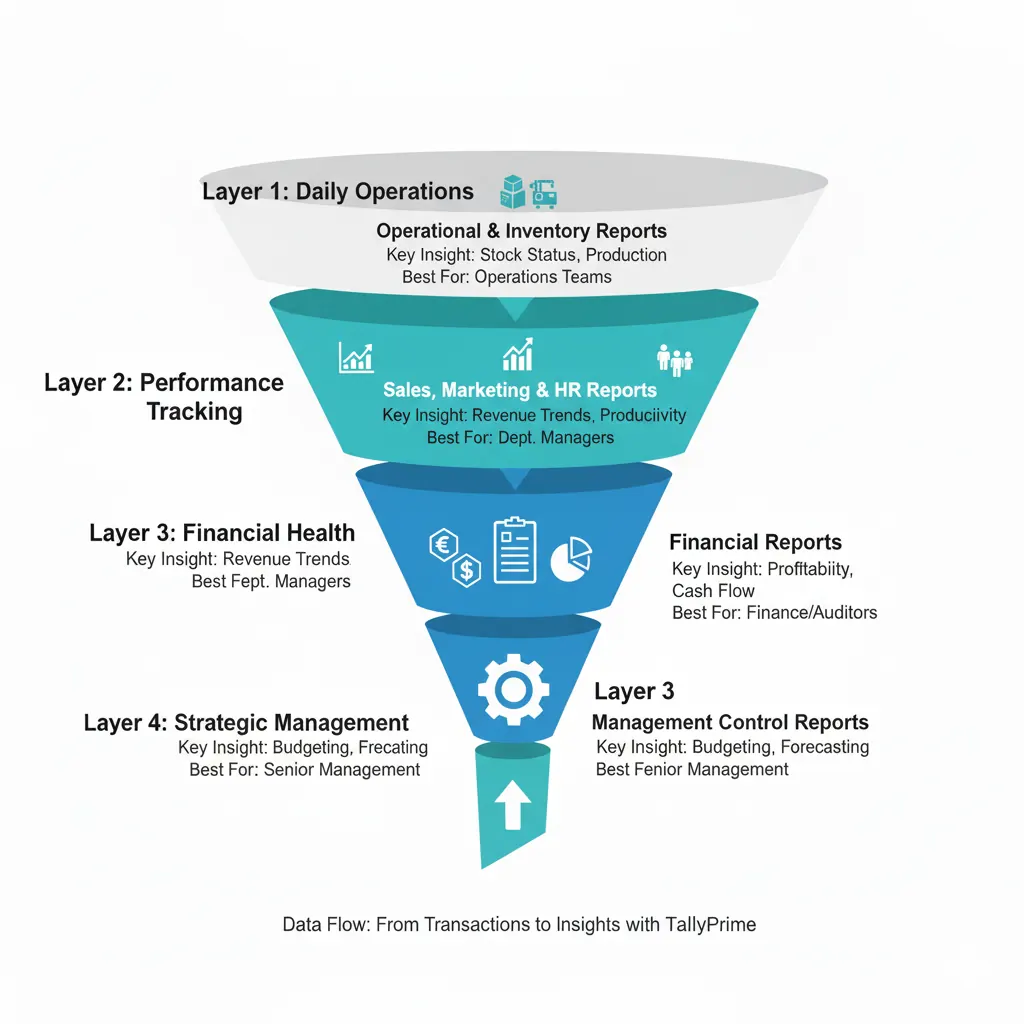
By reviewing financial reports in Tally, such as profit and loss reports, cash flow reports, and sales analysis reports, management can track revenue patterns, monitor expenses, and evaluate overall business performance. From top management to department heads, MIS reporting helps organizations analyze financial data and make informed business decisions that support long-term growth.
Why MIS Reports Matter for Business Decisions and How Tally Helps
As mentioned earlier, all businesses generate large volumes of accounting data every day, although these are raw data, and the numbers in these data rarely reveal the full story. Data from the International Trade Centre reveals that small businesses using tools like MIS to manage their data are nearly five times more likely to increase sales. These same firms are also 12 times more likely to cut costs than competitors, still stuck with manual processes.
Turning this data into a functional asset requires structure. TallyPrime handles this by converting everyday entries into clear performance trends and financial snapshots. Instead of diving into records manually, management can use these reports to spot risks and make moves based on live facts.
MIS reports allow businesses to review important financial insights like:
- Reviewing profit and loss reports to understand overall profitability.
- Analyzing cash flow reports to monitor liquidity and financial stability.
- Studying sales analysis reports to identify revenue trends.
- Checking inventory reports in Tally to manage stock efficiently.
- Monitoring outstanding receivables and payables for better financial control.
- Evaluating business performance reports for data-driven decision-making.
How Tally Supports MIS Reporting for Businesses
Businesses need quick access to reliable financial information to evaluate performance and plan future actions. Accounting software like TallyPrime is trusted by over 2.5 million businesses globally, making it one of the leading tools that help generate structured MIS reports in Tally directly from accounting records. Instead of manually compiling data from multiple sources, businesses can review financial reports, sales reports, and inventory reports from a single system.
- Generates financial reports in TallyPrime from real-time accounting data.
- Provides profit and loss reports, balance sheets, and cash flow reports for financial analysis.
- Offers sales analysis reports and inventory reports to monitor operational performance.
- Tracks outstanding receivables and payables for improved financial control.
- Allows customized management reports and business performance reports.
- Improves accuracy and consistency in financial reporting.
Types of MIS Reports in Tally Businesses Should Monitor
MIS reports in TallyPrime help businesses to understand financial performance, monitor operations, and identify areas that require attention. These reports convert accounting data into meaningful financial insights and business performance reports. It helps management make informed decisions based on real business activity, such as adjusting budgets, reallocating resources, or implementing new strategies to improve overall performance.
Profit and Loss Report
The profit and loss report in Tally shows how much income the business generates and how much it spends over a specific period. It helps management understand overall profitability and evaluate whether the business is moving in the right direction financially.
How it benefits businesses
- Shows the financial position of the business, whether it is operating at a profit or loss.
- Helps track revenue sources and expense patterns.
- It facilitates improved financial planning and effective cost control.
- Monitor your progress over months and years
Cash Flow Report
This report tracks how money moves in and out of the business. It helps businesses maintain financial stability by showing whether there is enough liquidity to handle daily operations and upcoming expenses.
How it benefits businesses
- Helps monitor cash availability for operations
- Identifies periods of cash shortages or surpluses
- Supports better financial management and payment planning
- Improves business financial stability
Sales Analysis Report
As the name suggests, the sales analysis report in Tally provides detailed insights into sales performance across products, customers, and times. You can understand revenue trends and identify which products or services generate the most revenue.
How it benefits businesses
- Highlights best-performing products or services
- Helps track sales trends and seasonal demand
- Supports data-driven sales strategy decisions
- Helps identify growth opportunities in revenue streams
Inventory Reports
Inventory reports in TallyPrime provide detailed information about stock levels, product movement, and inventory value. These reports help businesses maintain proper stock control and avoid operational disruptions caused by overstocking or stock shortages.
How it benefits businesses
- Helps monitor stock availability and product movement
- Prevents overstocking or inventory shortages
- Improves inventory management and purchasing decisions
- Provides clear visibility into inventory value
Outstanding Receivables and Payables Report
The report shows pending payments from customers and unpaid bills to suppliers. These reports help businesses maintain better financial discipline and ensure that cash flow remains healthy.
How it benefits businesses
- Tracks pending customer payments and supplier dues
- Improves cash flow management
- Helps reduce delayed payments and financial risks
- Supports better credit control and financial monitoring
How to Generate an MIS Report in TallyPrime
Businesses can use MIS reports in TallyPrime to review financial data in a structured way and understand overall performance, while built-in Tally reporting features enable them to analyze sales, expenses, inventory, and profitability directly from their accounting records without compiling data manually.
Here are the detailed steps to generate a standard MIS report in TallyPrime.
step 1
Open TallyPrime (any recent version) and choose the company whose data you want to examine.
step 2
Press Alt+G (Go To) and type the name of the report you need, such as Profit & Loss A/c, Balance Sheet, Cash/Fund Flow, Sales Register, Stock Summary, or Outstanding Receivables. TallyHelp specifically documents this Alt+G method for reports such as Sales Register and Stock Summary.
step 3
Use F2 (Period) to set the required reporting period so you can analyze business performance for a specific month, quarter, or financial year.
step 4
Use Ctrl+H (Change View) wherever available to switch the report format to daily, weekly, fortnightly, monthly, or other suitable views for analysis.
step 5
Review the report summary and drill down into ledgers, vouchers, stock items, or party-level details to understand the source of the numbers. TallyHelp notes that reports provide real-time data and can be explored in more detail as needed.
step 6
For broader analysis, open the Dashboard in TallyPrime to view a consolidated picture of sales, purchases, assets and liabilities, and cash movement. Tally states that the dashboard pulls information from more than 350 reports and gives a bird’s-eye view of business health.
step 7
If you need to share the report internally, use TallyPrime’s print or export options after reviewing the final view. Tally also supports viewing reports in a browser through its portal for selected use cases.
Businesses that need help setting up MIS reporting in Tally often work with certified Tally partners, such as Tally Solutions UAE, to guarantee their data matches every local VAT and audit .
Need Support with MIS Reporting in TallyPrime?
Many businesses use Tally for day-to-day accounting but do not fully use its management reports, dashboard views, and report configuration options, failing to see the full story behind their numbers until it’s time for a year-end audit. Getting the report structure right can make a big difference by replacing hours of manual spreadsheet filtering with a single, live view of your cash flow, margins, and departmental performance.
Tally Solutions UAE supports businesses that want to set up Tally correctly, configure reporting, and use MIS reports in TallyPrime more effectively for day-to-day monitoring and decision-making.
Conclusion
A structured MIS setup in TallyPrime shifts your focus from simple bookkeeping to active business oversight. By turning daily entries into live views of Profitability, Cash Flow, and Inventory, you move away from guesswork and into informed, data-backed management. In the UAE market, the right reporting configuration replaces hours of manual analysis with instant, accurate insights that align with local standards.
Partnering with Tally Solutions UAE allows firms that have outgrown basic ledgers to fine-tune reporting for high-level decision-making. This turns your accounting data from a historical record into a live map for your next move.
Frequently Asked Questions
1 What is an MIS report in TallyPrime?
An MIS report in TallyPrime is a management report that helps businesses analyze financial and operational data from their accounting system. These reports combine information from profit and loss statements, cash flow reports, sales analysis reports, and inventory reports to offer commentary on business performance and support better financial decisions.
2 Which MIS reports do businesses commonly use in Tally?
Businesses commonly rely on reports such as profit-and-loss statements, Balance Sheets, Cash Flow reports, Sales Analysis reports, Inventory reports, and Outstanding receivables and payables reports. These financial reports in TallyPrime help management monitor profitability, track expenses, manage stock levels, and maintain healthy cash flow.
3 How can businesses set up MIS reports effectively in TallyPrime?
While TallyPrime provides built-in reporting features, configuring the right reports and filters is important to get meaningful insights. Many businesses consult certified Tally partners such as Tally Solutions UAE to help set up reporting structures, configure management reports, and ensure accurate MIS reporting in TallyPrime.
4 Why should businesses work with a Tally partner for MIS reporting?
A certified Tally partner like Tally Solutions UAE can help businesses implement TallyPrime properly, configure financial reports, and customize MIS reports according to business needs. This ensures companies can monitor financial performance, sales trends, inventory levels, and cash flow more effectively to make better decisions regarding business growth.